
Finance Workflow Automation for Growing Finance Teams
Automate repetitive accounting workflows — from invoice processing and bank statement processing to reconciliation and management reporting — without changing your existing Tally workflow.

Are you a Company?
Automate Invoice & Bank Entry
AI processes invoices and bank statements with high accuracy. Get 90% ready entries that you can review and push directly to Tally — faster, error-free bookkeeping.
Match Invoices with PO & GRN
Ensure accurate payments with automated 3-way matching. Instantly identify quantity mismatches, missing items, or rate differences across invoices, PO, and GRN.
Custom Management Reporting
Create custom reporting tags based on your business requirements and automatically classify transactions. Generate expense, outstanding, aging and cash flow reports in minutes instead of days

Are you an Accounting Firm?
Scale Client Work Efficiently
Process client invoices faster and handle multiple companies with ease. Serve more clients without increasing headcount using AI-powered automation.
Direct Tally and Zoho Books Integration
Deliver accurate accounting faster by posting structured entries directly into Tally or Zoho Books.
Smart Vendor Creation
Automatically create vendors from new invoices with extracted details — no manual entry required.
Good accounting starts with Tyno AI
Tyno AI is an AI-powered Finance Workflow Automation platform that automates repetitive accounting and finance operations without changing your existing accounting process.
From invoice processing, PO & GRN matching, bank statement processing, reconciliations, reimbursements, and accounting entries to custom business reporting, Tyno helps finance teams reduce manual work, improve accounting accuracy and keep financial data ready for reporting.
Now connect Tyno with Claude using MCP to interact with your finance data through natural language.
Helping Finance Teams Process More Without Growing Headcount
10,000+ invoices processed every month
1,00,000+ of bank transactions automated monthly
5x faster invoice processing
Still Doing Accounting Manually? It’s Costing You Time & Accuracy
Pain
-
Entering invoice data manually
-
Processing expenses and reimbursements
-
Checking duplicate invoices
-
Matching invoices with purchase orders & GRN's
-
Recording bank transactions Manually
-
Preparing vendor payment sheets
-
Correcting accounting mistakes during month-end close
-
Preparing management reports manually
Risks
-
Data entry errors
-
Delayed vendor payments
-
Low productivity due to manual accounting work
-
Risk of sending payments to wrong vendor bank accounts
-
Early vendor payments due to poor tracking of credit days
-
Compliance risks (RCM, ITC, TDS errors)
-
Slower month-end close
-
Days spent preparing business-specific reports
Automate Accounts Payable, Bank Accounting and Finance Workflows
_gif.gif)
-
Tyno AI reads invoices, receipts, debit notes, credit notes and bank statements to automatically extract accounting data and prepare journal entries ready for review and posting into Tally. Reduce manual accounting work, improve accuracy and keep your books updated throughout the month instead of rushing during month-end close
-
Key Capabilities:
✔ Automatically detect RCM, ITC eligibility & TDS nature
✔ Support multi-currency invoices and bank transactions
✔ Identify new or changed vendor bank accounts
✔ Prepare ready accounting entries for Tally
✔ Maintain audit-ready supporting documents and accounting references
✔ Automatically apply custom reporting tags to transactions for one-click management reporting with full drill-down to transactions and source invoices.

AI Payable Assistant
Automate invoice processing, vendor payments, and compliance workflows from invoice capture to Tally posting.

Reporting Assistant
Stop spending days preparing reports. Generate business insights in minutes with automated tagging.

AI Bank Entry Assistant
Automatically extract bank transactions, assign ledgers, and reconcile payments with invoices.
How it Works?
Discover how effortlessly you can automate workflows with AI Payable Assistant, review entries from AI Bank Entry Assistant, and post directly to Tally
1
Upload Invoices
Easily upload invoices (PDFs, scans, or Excel files).
Tyno automatically reads the documents and extracts key accounting data such as vendor details, GST, TDS, line items, and narration — preparing a near-ready entry.
_gif.gif)
2
Review AI Entries
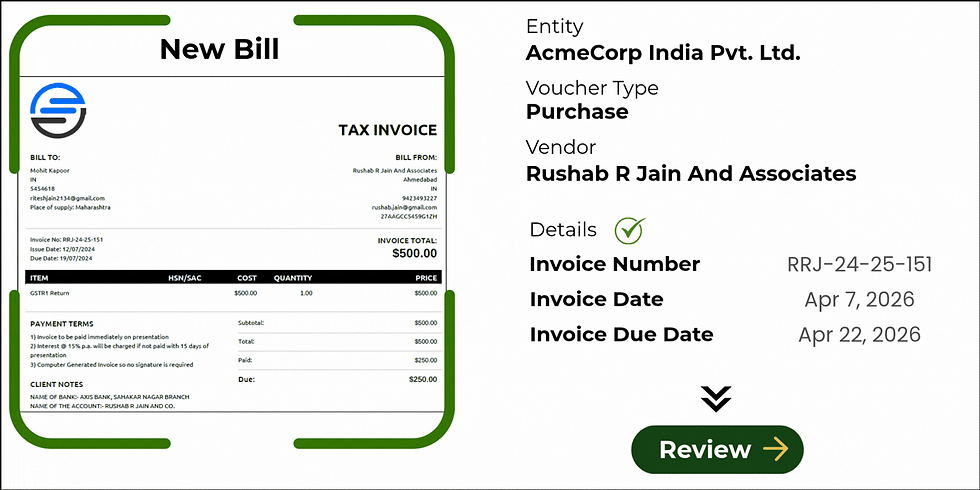
AI prepares 90% ready accounting entries by selecting ledgers, categorizing line items, applying GST, TDS, and generating proper narration.
You simply review and verify the entry alongside the original document.
3
Post to Tally or Zoho Books
Once reviewed, post entries directly to Tally (or Zoho Books).
No need to manually create journal entries or tax calculations — everything is handled automatically with complete accuracy.


4
Track Payments and Generate Reports
Record payments and synchronize them with Tally. Track paid, unpaid and overdue invoices from one place while generating expense, outstanding and cash flow reports whenever needed.
%20(3)_gif.gif)
%20(6)_gif.gif)
%20(2)_gif.gif)
_gif.gif)
Core Benefits (Why Customers Use It?)
Process invoices 5x faster
AI extracts invoice data, line items and GST details automatically, preparing accounting entries ready for review and posting.
Automated Bank Accounting
Upload bank statements and automatically extract transactions, suggest ledgers and prepare accounting entries.
Auto Reconcile Payments
Link payments and receipts to invoices while processing bank statements.
Invoices are automatically reconciled in Tally, reducing manual effort and errors.
Reduce Manual Work
Eliminate repetitive data entry across invoices and bank transactions. Free up your team to focus on analysis and decision-making.
Improve Accuracy/Compliance
Automatically detects RCM applicability, ITC eligibility, and TDS nature. Ensure accurate accounting and stay compliant with tax regulations.
Prevent Duplicate Invoices
Identify duplicate invoices automatically before processing payments. Avoid overpayments and maintain clean financial records.
Never Miss Due Payments
Track vendor credit days and auto-calculate invoice due dates.
Easily monitor outstanding bills and avoid late payment penalties.
Claude + Tyno MCP
Connect Tyno with Claude through MCP to ask questions, explore accounting data, and access Tyno's finance capabilities without manually searching through reports and transactions.
Multi-Currency Accounting
Process invoices and bank transactions in multiple currencies with automatic exchange rate application.
Manage Multiple GSTINs
Configure entity-specific accounting rules and process transactions across multiple companies and GST registrations.
One-Click Management Reporting
Create custom reporting tags and automatically classify transactions. Generate expense, outstanding, aging and cash flow reports in minutes instead of days.
Reporting-Ready Accounting Data
Automatically suggests ledgers based on past invoices and transactions
Continuously learns from invoices and bank entries to improve accuracy
Core Features
AI Payable Assistant
Automatically extract vendor details, line items, and taxes to convert invoices into ready-to-post accounting entries instantly.
Expense & Reimbursement
Simplify employee claims by uploading receipts to trigger automated accounting entries and approval workflows
AI Bank Entry Assistant
Import statements to auto-extract transactions with AI-suggested ledger accounts based on your historical data.
Automated Reconciliation
Link bank transactions to invoices automatically. Once posted in Tally, invoices are "knocked off" without manual matching.
PO, GRN & Invoice Matching
Instantly match invoices with Purchase Orders and GRNs to catch discrepancies before you process any payments.
Smart Intelligence
Automatically detect duplicate invoices, RCM applicability, ITC eligibility, TDS nature and vendor bank account changes before processing.
Multi-Currency Support
Manage global transactions with ease. Capture foreign invoices and auto-apply exchange rates directly to Tally.
Multi-Entity & GSTIN
Manage multiple companies, GST registrations and accounting workflows from a single platform with entity-specific configurations.
Claude + MCP Integration
Connect Tyno with Claude using Model Context Protocol (MCP) to securely interact with finance data and Tyno workflows using natural language.
Management Reporting Automation
Create custom reporting tags that match your business requirements. Tyno automatically classifies transactions and generates expense, outstanding, aging and cash flow reports in a few clicks with full drill-down to transactions and source invoices.

Talk to Your Finance Data with Claude
Connect Tyno with Claude using MCP and interact with your finance data and workflows using natural language.
Ask questions about invoices, payments, expenses, outstanding balances, transactions and reports — without manually searching through accounting data.
Ask. Understand. Act.
-
Ask finance questions in natural language
-
Explore your connected Tyno data and reports
-
Get answers with relevant financial context
-
Act using available Tyno workflows
Before Tyno Vs After Tyno
-
Manual invoice data entry
-
Manual bank statement reconciliation
-
Risk of paying wrong vendor bank accounts
-
Manual foreign currency calculations
-
Difficulty tracking invoice payments
-
Creating vendor payment sheets in Excel
-
Delayed month-end close due to repetitive accounting work
-
Days spent preparing expense, outstanding and cash flow reports
-
Time spent matching invoices, payments and receipts
-
AI-powered invoice extraction
-
Automated vendor payment sheet generation
-
Automatic bank transaction extraction
-
Multi-currency invoices and bank transactions supported
-
Payments & receipts automatically reconciled with invoices
-
Vendor bank account verification from invoices
-
Faster month-end close with fewer manual tasks
-
Generate management reports in minutes instead of days
-
One-click posting of thousands of entries directly to Tally
Frequently Ask Questions (FAQs)
Tyno AI reads invoices, bank statements, receipts and supporting documents to automatically extract accounting data, suggest ledgers and prepare entries ready for review and posting.
Yes, Tyno supports automated 3-way matching to help you identify mismatches in quantity, rate, or missing items before processing payments.
Employees submit bills via email or portal. Managers approve them, and approved entries are pushed directly to Tally — no spreadsheets or manual tracking.
Yes, once entries are reviewed, they can be pushed directly into Tally with all required details like tax, ledger, TDS, and narration.
Yes. Documents and accounting data are stored securely with controlled access. Tyno follows industry-standard security practices, and customer data remains private and isolated.
Tyno allows you to create custom reporting tags based on your business requirements and automatically applies them during transaction processing. Generate expense, outstanding, aging, cash flow, business-unit and ledger-wise reports in minutes with full drill-down to transactions and source invoices. instead of spending days preparing data manually.
Absolutely. Tyno helps accounting firms manage multiple clients, process high volumes of invoices, and scale operations without increasing headcount
Tyno can read PDFs, scanned images, Excel files, and even handwritten bills with high accuracy.