
Why Invoice OCR Alone Doesn't Solve Finance Operations

Updated: Sep 24
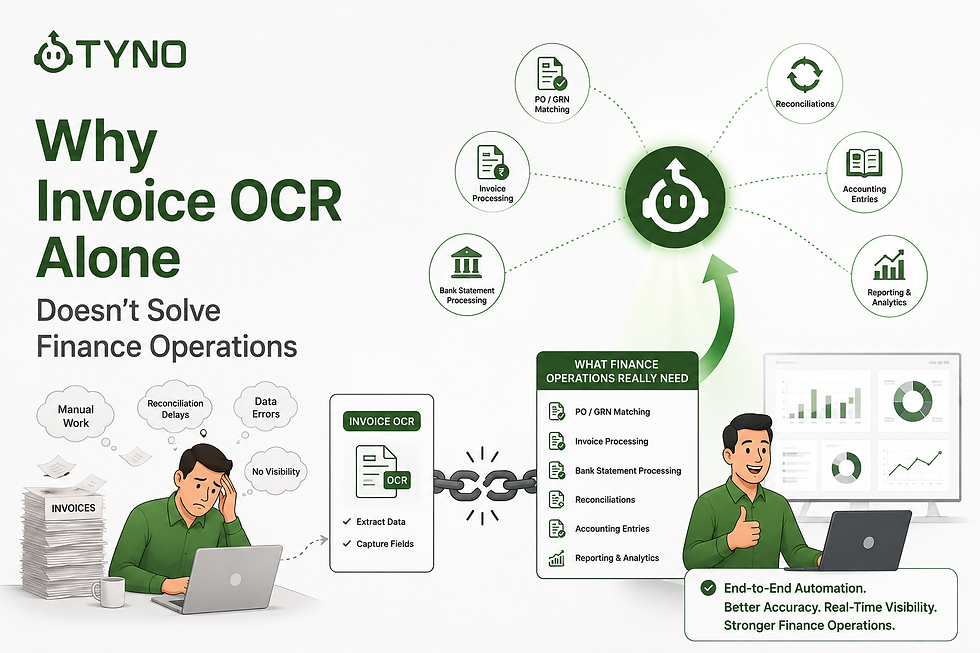
If you search for ways to automate invoice processing, you'll quickly find dozens of invoice OCR and invoice automation tools.
Most promise the same thing:
"Upload your invoice, and we'll extract all the data automatically."
At first glance, that sounds like the solution to manual invoice processing.
No more typing invoice numbers.
No more copying GST details.
No more entering vendor information manually.
But invoice data extraction is only one part of the accounting workflow.
For finance teams, the real work often begins after the invoice has been read. Someone still needs to validate the invoice, select the correct ledger, check for duplicates, match the purchase order and GRN, apply accounting and tax rules, route approvals, and create the final accounting entry.
That's why invoice OCR alone doesn't solve finance operations.
The bigger opportunity is invoice processing automation—connecting invoice extraction with the accounting workflows that happen after extraction.
Let's look at what that means in practice.
What Invoice OCR Actually Does?
Invoice OCR (Optical Character Recognition) converts information from invoices into structured data.
A good OCR engine can identify:
Vendor name
Invoice number
Invoice date
GSTIN
Invoice value
Tax amounts
Line items
This is where invoice OCR software provides value: it converts unstructured invoice documents into structured information that accounting systems can use.
However, OCR primarily solves invoice data extraction. It does not automatically complete the accounting workflow.
To achieve true invoice automation, the extracted information needs to be connected with accounting rules, ledger mapping, PO and GRN matching, duplicate detection, approvals, tax treatment, and ERP posting.
This saves time compared to manual data entry.
But extracting data is only the first step of the accounting process. Imagine receiving a package. OCR tells you what's inside the box. Finance still has to decide what to do with it.
The Real Finance Workflow Starts After OCR
Let's follow the journey of a purchase invoice.
Traditional Workflow
Invoice Received
↓
OCR Extracts Data
↓
Finance Reviews Extracted Data
↓
Find Purchase Order
↓
Match Goods Received
↓
Check Duplicate Invoice
↓
Select Ledger Accounts
↓
Verify GST Treatment
↓
Approval Workflow
↓
Create Accounting Entry
↓
Post to Tally / ERP
↓
Archive Documents
Notice something?
OCR only handles one step. Everything else is still manual. And those remaining steps consume most of the finance team's time.
This is the difference between invoice data extraction and automated invoice processing. Extracting information from a document is useful, but finance teams get the larger productivity gains when the extracted data automatically moves through the accounting workflow.
Where Finance Teams Actually Lose Time
1. Purchase Order Matching
The invoice says 100 units. The Purchase Order says 100 units. The Goods Receipt says 98 units. Should the invoice be accepted? Should it go for approval? Should it be held?
OCR cannot answer these questions. Someone still has to compare documents manually.
2. Ledger Selection
Suppose two vendors send identical invoices. Should they be booked under:
Office Expenses?
Repairs & Maintenance?
Software Expenses?
Capital Asset?
This depends on company accounting policies. OCR doesn't understand your chart of accounts or historical accounting practices. Finance professionals still spend valuable time selecting the correct ledger.
3. Duplicate Invoice Detection
Vendors often resend invoices. Sometimes the same invoice arrives:
through email
through WhatsApp
from another team member
Without intelligent duplicate detection, duplicate accounting entries or payments become a real risk. OCR treats every document as a new invoice.
4. Approval Workflows
Should this invoice go to Procurement? Plant Manager? Finance Controller? CFO?
Approval depends on:
Invoice amount
Vendor
Cost center
Business rules
OCR extracts information. It doesn't manage approvals.
5. Accounting Entries
Even after extraction, someone still has to prepare the accounting entry. This is where basic OCR and AI-powered invoice processing start to differ.
A finance workflow may need to determine:
GST treatment
Expense or purchase ledger
Cost center allocation
Multi-ledger splits
TDS considerations
Narration
Duplicate invoice status
PO and GRN matching
Final posting into Tally or another ERP
A complete invoice automation workflow can use the extracted invoice data along with accounting rules and historical transaction patterns to prepare an entry for review.
The goal isn't simply to read the invoice. The goal is to turn the invoice into accounting-ready data.
OCR Solves Data Entry. Workflow Automation Solves Finance Operations.
This is where many businesses make an expensive mistake. They purchase OCR software expecting end-to-end automation.
There is also a common misconception that invoice automation is simply a more advanced version of OCR. In reality, modern invoice processing automation can extend across accounting, validation, approvals, reconciliation, and ERP posting. We explore this distinction in more detail in our guide to the biggest myths about invoice automation.
Someone still needs to:
✓ Validate invoices
✓ Match Purchase Orders
✓ Suggest ledger accounts
✓ Detect duplicates
✓ Route approvals
✓ Create accounting entries
✓ Push data into ERP
The finance team is still heavily involved. The bottleneck has simply moved further down the process.
Invoice OCR vs Invoice Automation
The difference becomes clearer when the two approaches are compared side by side.
Finance task | Invoice OCR | Invoice automation |
Extract vendor details | ✓ | ✓ |
Extract invoice number and date | ✓ | ✓ |
Extract GST and tax details | ✓ | ✓ |
Suggest accounting ledgers | Usually manual | Automated / AI-assisted |
Detect duplicate invoices | Limited | Automated |
Match PO and GRN | No | Yes |
Apply accounting rules | No | Yes |
Prepare accounting entries | Usually manual | Automated / AI-assisted |
Route approval workflows | No | Yes |
Post to accounting software | Usually requires additional steps | Can be integrated into workflow |
Support end-to-end AP workflow | No | Yes |
The key difference is simple:
OCR reads the invoice. Invoice automation helps process the invoice.
For growing finance teams, that distinction matters because the time spent on accounting often extends far beyond extracting information from the document.
What Modern Finance Automation Looks Like
Instead of stopping after OCR, modern finance teams automate the complete workflow.
A smarter process looks like this:
Invoice received automatically
AI extracts invoice data
Purchase Order matched
Goods Receipt verified
Duplicate invoice checked
Ledger accounts suggested
GST validated
Approval workflow triggered
Accounting entry prepared
Data posted into Tally
Documents archived automatically
Now finance professionals spend their time reviewing exceptions—not performing repetitive tasks.
What About Businesses Using Tally?
For businesses using Tally, invoice automation should not mean creating a separate accounting process outside the existing workflow.
The goal is to automate repetitive steps around Tally—such as invoice data extraction, ledger suggestions, GST and TDS treatment, duplicate detection, PO and GRN matching, and accounting entry preparation. Businesses looking to understand the practical process can also learn how to automate invoice entry in Tally step by step.
This approach helps businesses improve accounting automation in Tally without replacing the accounting system they already use.
Why Invoice Automation Matters for Growing Businesses
When you're processing 50 invoices a month, manual invoice processing may feel manageable. At 500 invoices, delays begin to appear. At 2,000 invoices, repetitive accounting work can become an operational bottleneck.
The challenge isn't only the number of invoices. Every invoice can require validation, ledger selection, tax treatment, PO or GRN matching, duplicate checks, approvals, accounting entry preparation, and posting.
This is why invoice automation becomes more valuable as transaction volumes grow.
Instead of simply extracting invoice data faster, finance automation can reduce the repetitive work surrounding each invoice and allow finance professionals to focus on review and exceptions.
The Future of Finance Isn't Better OCR
OCR has become a standard capability. The competitive advantage now comes from what happens after extraction.
The most effective finance teams are moving beyond document digitization and adopting intelligent workflows that automate repetitive accounting tasks while keeping people in control of decisions and approvals.
That's the difference between digitizing invoices and transforming finance operations.
Final Thoughts
Invoice OCR is an important building block—but it isn't the finish line.
If your finance team is still matching purchase orders manually, selecting ledger accounts, chasing approvals, checking for duplicates, and creating accounting entries by hand, then OCR alone won't eliminate your bottlenecks.
The next stage of finance automation is connecting every step into a single intelligent workflow.
That's where the biggest gains in productivity, accuracy, and visibility are achieved.
Move From Invoice OCR to Invoice Automation?
Tyno AI helps finance teams automate more than invoice data extraction.
Its AI Payable Assistant can extract invoice data, suggest accounting ledgers, apply GST, TDS and other accounting rules, identify duplicate invoices, support PO and GRN matching, and prepare accounting entries for review and posting into Tally.
The difference is that Tyno is designed around the complete invoice processing workflow, not just OCR.
If your finance team has already automated invoice data extraction but still spends significant time reviewing, categorizing, matching, approving and posting invoices, the next step is invoice automation.
Book a demo to see how Tyno can help automate the repetitive work around your existing accounting process.
Frequently Asked Questions (FAQ)
Is invoice OCR the same as invoice automation?
No. Invoice OCR primarily extracts information from an invoice, such as vendor details, invoice numbers, dates and tax amounts. Invoice automation goes further by connecting extraction with accounting workflows such as ledger mapping, duplicate detection, PO and GRN matching, approvals and accounting entry preparation.
What is invoice processing automation?
Invoice processing automation uses software or AI to automate repetitive steps involved in processing purchase invoices—from extracting invoice data to validating information, applying accounting rules, preparing entries and posting them into an accounting system.
Can invoice automation work with Tally?
Yes. Invoice automation can be used alongside Tally to automate repetitive invoice processing tasks while keeping Tally as the accounting system. The workflow can prepare accounting-ready entries for review and posting into Tally.
Does invoice automation replace accountants?
Invoice automation is generally used to reduce repetitive data entry and processing work rather than eliminate human review. Finance professionals can review exceptions, validate important decisions and handle cases that require judgment.


Comments