
Why Reporting Problems Usually Start in Accounts Payable

Updated: Sep 24
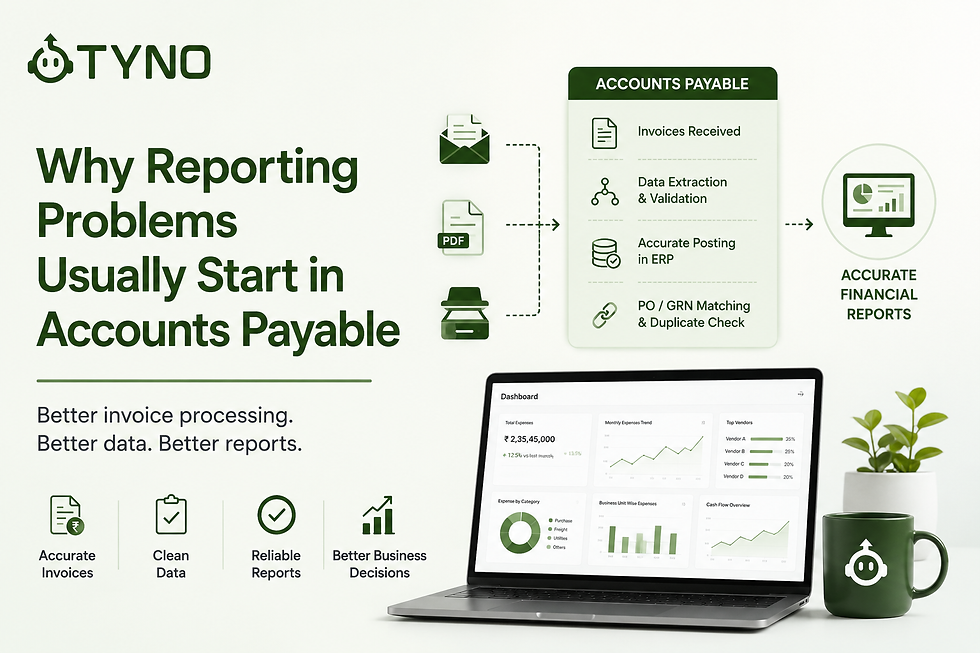
Finance leaders often assume reporting problems are caused by Excel, ERP limitations, or the lack of a better dashboard.
But many financial reporting problems actually begin much earlier — inside the accounting workflow.
When invoices are entered late, assigned to the wrong ledger, duplicated, or left unprocessed, the accounting data reaching management reports is already incomplete or inconsistent. The reporting system can only work with the data it receives.
This is why accounts payable automation is closely connected to reporting accuracy. Better financial reporting does not begin with another dashboard. It begins with accurate, complete, and timely accounting data.
For growing businesses, improving invoice processing and Accounts Payable can therefore improve not only productivity, but also the quality of financial reporting.
Reporting Is Only as Good as the Data Behind It
Imagine trying to build a monthly P&L. Some invoices are still lying in email. Some are waiting for approval. Others are entered with the wrong expense ledger. A few are duplicated. Some haven't been entered at all.
Even if your ERP produces a report instantly, the numbers won't reflect reality. The reporting system is doing exactly what it was asked to do. It's simply reporting inaccurate or incomplete accounting data.
Small AP Errors Become Large Reporting Problems
Many reporting issues originate from small manual mistakes during invoice processing.
Examples include:
Wrong expense ledger selection
Incorrect GST classification
Duplicate invoice entry
Missing invoices
Wrong vendor mapping
Incorrect business unit allocation
Delayed invoice posting
Manual data entry mistakes
Each mistake may seem insignificant. However, across hundreds or thousands of invoices every month, these errors compound into unreliable financial reports.
How Accounts Payable Errors Affect Financial Reporting
Accounts payable data flows into several areas of financial reporting. A small accounting error at the invoice-processing stage can therefore affect more than one report.
For example:
Wrong expense ledger: Operating expenses may be classified incorrectly, affecting the P&L.
Incorrect cost centre or business unit: Management may see inaccurate department or business-unit performance.
Missing invoices: Expenses and liabilities may be understated until the invoices are recorded.
Duplicate invoices: Expenses and vendor liabilities can be overstated.
Delayed invoice posting: Month-end expenses and outstanding payables may not reflect the latest information.
Incorrect GST or tax classification: Tax-related reporting may require additional review and correction.
Inconsistent vendor mapping: Vendor spending analysis can become difficult when transactions are not consistently classified.
This means financial reporting accuracy depends partly on the quality of the Accounts Payable process. The report is only the final output; the underlying accounting workflow determines how reliable that output is.
Why Finance Teams Lose Confidence in Reports
When management notices inconsistent numbers, finance teams often spend days verifying data instead of analyzing it.
Questions start appearing:
Why did expenses increase?
Why doesn't this match last month's report?
Why is vendor spending different?
Why is the cash flow report changing every week?
Instead of making decisions, everyone starts investigating the data. Reporting becomes an audit exercise.
Month-End Becomes a Firefighting Exercise
Many finance teams experience the same pattern every month. Week one feels manageable. Then month-end arrives.
Now the team must:
Collect missing invoices
Download attachments from emails
Enter invoice data manually
Verify GST details
Match invoices with purchase orders
Reconcile vendor balances
Correct accounting mistakes
Generate management reports
The reporting delay is often caused by the workload created during invoice processing, not by the reporting software.
Better Reporting Starts with Better Invoice Processing
When invoice processing is standardized and automated, reporting improves naturally. Invoices are captured faster. Vendor information stays consistent. Accounting entries become standardized. Duplicate invoices are identified early. Purchase order references remain linked. Business unit allocation becomes consistent.
As a result:
Month-end closes faster
Reports become more accurate
Finance teams spend less time correcting data
Leadership gains confidence in financial numbers
Automation Improves Reporting Without Changing Your ERP
Many organizations assume they need a new ERP to improve reporting. Often they don't. If the ERP already stores financial data, improving the quality of data entering the system delivers significant reporting improvements.
AI-powered invoice processing can:
Extract invoice data automatically
Suggest ledger accounts
Validate GST information
Detect duplicate invoices
Match invoices with purchase orders or GRNs
Apply predefined accounting rules before posting
Reduce manual data entry significantly
The ERP continues doing what it already does well. The difference is that it receives cleaner, more accurate accounting data.
Improving Reporting Without Replacing Tally
For businesses already using Tally, improving financial reporting does not necessarily mean replacing the accounting system.
The bigger opportunity can be improving the workflows that feed accounting data into Tally.
Invoice processing, bank transaction processing, reconciliation, and accounting classification can be automated around the existing workflow. Once the underlying entries are more consistent and up to date, finance teams can generate more reliable expense, outstanding, aging, and cash flow reports.
This approach allows businesses to improve accounting automation in Tally while keeping Tally as the core accounting system.
How Accounts Payable Automation Improves Reporting
Accounts payable automation is not only about processing invoices faster. A well-designed AP automation workflow can also improve the quality and consistency of accounting data entering the ERP.
An automated AP process can help finance teams:
Capture invoice data from PDFs, scans, and digital documents
Standardize vendor and invoice information
Suggest the appropriate accounting ledger
Apply accounting and tax rules consistently
Detect duplicate invoices before posting
Match invoices with purchase orders and GRNs
Maintain references between invoices and accounting entries
Reduce delays in invoice posting
Prepare accounting entries for review before posting
The result is a more consistent flow of accounting data from invoice capture to the general ledger.
For businesses using Tally, this can be particularly useful because AP automation for Tally can improve the quality of entries going into the existing accounting system without requiring the finance team to replace its current ERP.
The objective is not simply to automate Accounts Payable. It is to create a finance workflow that continuously produces cleaner, more structured accounting data for reconciliation, compliance, and financial reporting. Learn more about why structured accounting data is the foundation of better reporting.
Why Reconciliation Also Matters for Reporting
Invoice processing is only one part of the accounting workflow. Payments and bank transactions also need to be matched with the correct invoices and accounting records.
If payments remain unreconciled, vendor balances may not be accurate. Outstanding reports can show invoices as unpaid even when payment has already been made. Finance teams may then spend additional time investigating differences before management reports can be finalized.
This is why the flow from invoice processing → accounting entries → payment recording → reconciliation → reporting matters.
When these processes are connected, finance teams can maintain more reliable outstanding, expense, cash flow, and management reports without repeatedly cleaning the data at month-end.
Poor accounting entries can make this process much harder. Learn how poor accounting entries create expensive reconciliation problems and why fixing accounting data at the source can reduce downstream work.
A Real Example: From AP Processing to Better Reporting
One of our customers, a growing EV charging company, was processing more than 2,000 purchase invoices and 5,000+ bank transactions every month.
The finance team was manually entering invoice details, validating accounting information, matching invoices with purchase orders, and preparing the data required for reporting.
Because Accounts Payable processing was not completed on time, management reporting was also delayed.
After automating the finance workflow with Tyno:
Invoice data entry became largely automated
Purchase orders were matched with invoices
Duplicate invoices were identified early
Bank transactions were processed with less manual effort
Accounting data became available sooner for reporting
Management reports could be prepared sooner after month-end
The improvement was not simply faster invoice processing. The larger benefit was having more complete and consistent accounting data available when management needed it.
This illustrates an important point: financial reporting automation starts with the processes that create financial data.
Reporting Is an Output, Not the Starting Point
Organizations often invest in dashboards and financial reporting automation before fixing the accounting processes that feed those dashboards.
But every financial report depends on the quality of the underlying accounting data.
But every report depends on:
Accurate invoice capture
Correct accounting entries
Consistent ledger mapping
Timely processing
Clean financial data
If these foundations are weak, no reporting tool can fully compensate. Improving Accounts Payable is often the fastest way to enhance reporting quality across the entire finance function.
Final Thoughts
Financial reporting problems are often treated as reporting problems. But the underlying issue may be much earlier in the finance workflow.
When invoices are missing, accounting entries are inconsistent, payments are not reconciled, or transactions are posted late, financial reports become harder to trust and more time-consuming to prepare.
Improving Accounts Payable can therefore have an impact beyond invoice processing. Better invoice capture, standardized accounting rules, automated reconciliation, and timely posting create a stronger foundation for management reporting.
Businesses do not always need a new ERP or another dashboard to improve financial visibility. In many cases, the first step is improving the quality of the accounting data that feeds the existing system.
Reliable financial reporting starts with reliable accounting data — and that process begins when the transaction enters Accounts Payable.
The Path to Enhanced Reporting
To achieve better reporting, finance teams must focus on the entire process. This includes:
Streamlining invoice submissions
Training staff on best practices
Implementing robust validation checks
By addressing these areas, teams can ensure that the data feeding their reports is accurate and timely.
The Role of Technology
Investing in technology can significantly enhance reporting capabilities. AI and automation tools can simplify invoice processing, reduce errors, and provide real-time insights.
Conclusion
In conclusion, the path to reliable financial reporting starts with effective Accounts Payable management. By prioritizing data accuracy and leveraging technology, finance teams can transform their reporting processes and drive better business decisions.
Remember: Better reporting begins with better data.


Comments